Cooking Adventure Noma Chef Guide
Customize the Steam chef without sabotaging your kitchen upgrade plan.
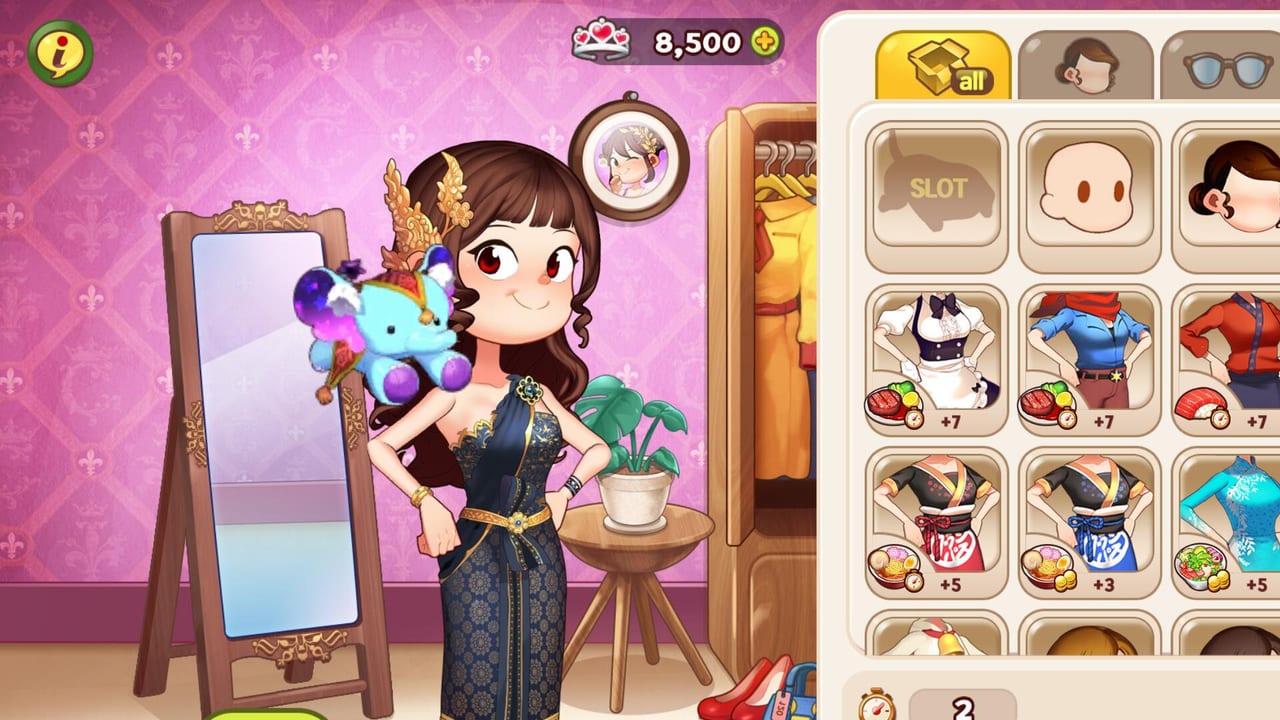
Noma is the face of Cooking Adventure on Steam: the chef you move through 12 restaurants and 540 stages of single-player cooking time management. BPMG rebuilt the experience for mouse and keyboard, kept the colorful 2D presentation, and positioned costume collecting as a core fantasy alongside upgrades and competitions. This guide explains who Noma is on PC, how costumes fit your economy, and how to chase looks without failing three-star goals.
Noma on Steam versus Norma on mobile
The mobile Cooking Adventure / My Little Chef service has long centered on chef Norma. Steam store feature copy for the PC edition highlights chef Noma. You will still see Norma in older trailers, social posts, and thank-you gift headlines. For this wiki’s Steam guides we default to Noma when talking about the PC protagonist, and we mention Norma only when quoting mobile-era or mixed marketing language.
Functionally, you are still the same apron-wearing time-management hero: take orders, cook under pressure, serve before patience runs out, upgrade the kitchen, and optionally dress up between shifts.
What Noma actually does in gameplay
Noma is not a party member you bench. Noma is your cursor-driven chef avatar inside each stage. Performance comes from:
- How fast you route between stations
- How well you remember recipe sequences
- How upgraded your cookers and ingredients are
- How calmly you prioritize impatient customers
Costumes change the vibe of that fantasy and can include collection goals tied to currencies such as Tiara. They should support motivation—not replace the mechanical truth that a slow grill loses stars.
Costumes and customization
Official Steam features call out dressing Noma in various costumes and matching looks to each restaurant’s mood. That matters for players who want a coffee-shop outfit in Coffee House or a sharper uniform before competitions. Launch messaging also framed purchaser thank-you rewards as a way to fund a full costume set via a large Tiara grant, alongside Gems and Cony.
Practical costume advice:
- Clear early stages and fix station bottlenecks first (upgrade priority).
- Claim any official purchaser gift before spending real money elsewhere.
- Buy a costume bundle when you have surplus currency or gift Tiara.
- Match outfits to restaurants for fun, then get back to routing practice.
- Do not reset your upgrade plan just to complete a wardrobe checklist on day one.
If a costume advertises a gameplay-facing bonus in its description, read it carefully—but still compare the benefit to simply leveling the station that burns food. Throughput usually wins.
Launch gifts, currencies, and shopping order
Around Steam launch, BPMG highlighted:
- Buy-once access with no required currency packs for the base content
- A planned surprise gift for purchasers
- Thank-you package details on the order of ~30,000 Tiara, 100 Gems, and 100,000 Cony
Use gift Tiara for costume goals. Use stage-earned currency for stations and ingredients. Keep mobile gift codes out of the picture—they do not apply on Steam (how to redeem).
Suggested wallet split for the first dozen hours:
- 60–70% cooking stations and core equipment
- 20–30% ingredient speed for the current restaurant
- 10% or leftovers cosmetics and Noma outfits
Adjust upward for costumes only after your active kitchen can three-star consistently.
Noma and restaurant mastery
Each house asks Noma for a different skill accent:
- Grill — flip timing and lane discipline
- Sushi — sequence memory and parallel rolls
- Coffee / Doughnut — prep during quiet beats, then survive spikes
- Pasta / Ramen — never forget boiling timers
- Chinese — denser multitasking under demo-proven stress
Read the full playstyle notes in the restaurants overview and compare stress levels on the difficulty tier list. Noma’s costumes will not boil noodles for you when Ramen peaks.
Competitions, achievements, and long-term goals
Cooking competitions ask for speed, accuracy, and combo discipline on themed restaurant stages. Leaderboard climbs feel better when Noma’s kitchen is upgraded and your click paths are clean. Steam lists 44 achievements, which commonly push completionists through restaurant clears, score targets, and collection goals. Treat wardrobe achievements as endgame seasoning after the hard kitchens are under control.
Tips for new chefs controlling Noma on PC
- Learn mouse routes that minimize travel between cooker and serve point.
- Use keyboard shortcuts once you are comfortable; high scores love fewer wasted motions (system tips).
- Replay a failed stage immediately after an upgrade so Noma’s timing adapts.
- Watch one short official kitchen trailer if a restaurant’s tools feel unclear—Sushi House Steam clips are especially helpful.
- Keep Getting Started bookmarked for day-one objectives.
Naming FAQ inside the guide
If a patch note, costume tooltip, or social post says Norma while the store page says Noma, do not panic. You have the right game. BPMG’s PC edition shares DNA with the mobile service; branding strings sometimes mix. This page will keep using Noma for Steam unless an official PC rename says otherwise.
Related links
- Characters & Restaurants Hub
- Costumes & Tiara
- Restaurants Overview
- Owner Thank-You Gift
- Codes Hub and How to Redeem
- Steam Launch Update
- Wiki overview
Master the kitchen first. Then make Noma look incredible doing it.
Frequently Asked Questions
Quick answers for new and returning chefs.
Who is Noma in Cooking Adventure?
Noma is the Steam edition’s featured chef avatar you control across restaurants, upgrades, costumes, and competitions.
Should I buy costumes before upgrading stations?
No. Follow upgrade priority: stations, then ingredients, then cosmetics and outfits.
Can launch gifts fund a full costume set?
Thank-you messaging described a large Tiara grant framed as enough for a full costume set, plus Gems and Cony. Claim it when BPMG enables delivery.
Do mobile Norma cosmetics transfer to Steam Noma?
No. Mobile and Steam progressions are separate even when branding overlaps.